Last updated by Maggie on
Everyday tools · ADHD & time
4 ADHD time blindness tools for everyday life.
When checking the clock isn’t enough, a different cue can help. Compare four ADHD time management tools for adults, with simple ways to use each one at home or at work.

This page contains affiliate links. As an Amazon Associate, I earn from qualifying purchases, at no extra cost to you.
01 / Make minutes visible
Time Timer MOD
A visual timer for ADHD adults
The colored disk gets smaller as time passes. Keep it beside your work, on the counter, or where you get ready so you can glance at the time remaining without reaching for your phone.
One way to use it
Leaving at 2:30? At 2:10, set a 20 minute countdown for shoes, your bag, and the last few things you need to do.
Before you choose
Think about where you’ll put it. A visual countdown is most useful when it’s in your line of sight. For reminders while you move between rooms, a cue on your wrist may be a better fit.

02 / Give mornings a checkpoint
La Crosse alarm clock
Two alarms for your morning routine
A large display makes the time easy to check from across the room. The dual alarms can mark two different moments in your ADHD morning routine, such as waking up and starting to get ready.
Try a second checkpoint
Set one alarm for waking up and the second for getting dressed. Choose a specific action for that second sound before morning arrives.
Before you choose
The linked clock is the La Crosse 617-249 with a blue LED display. Check its brightness settings, power needs, and alarm sound against what you prefer in a bedroom.
If your current clock already has two alarms, try this setup with that first.
03 / See the whole week
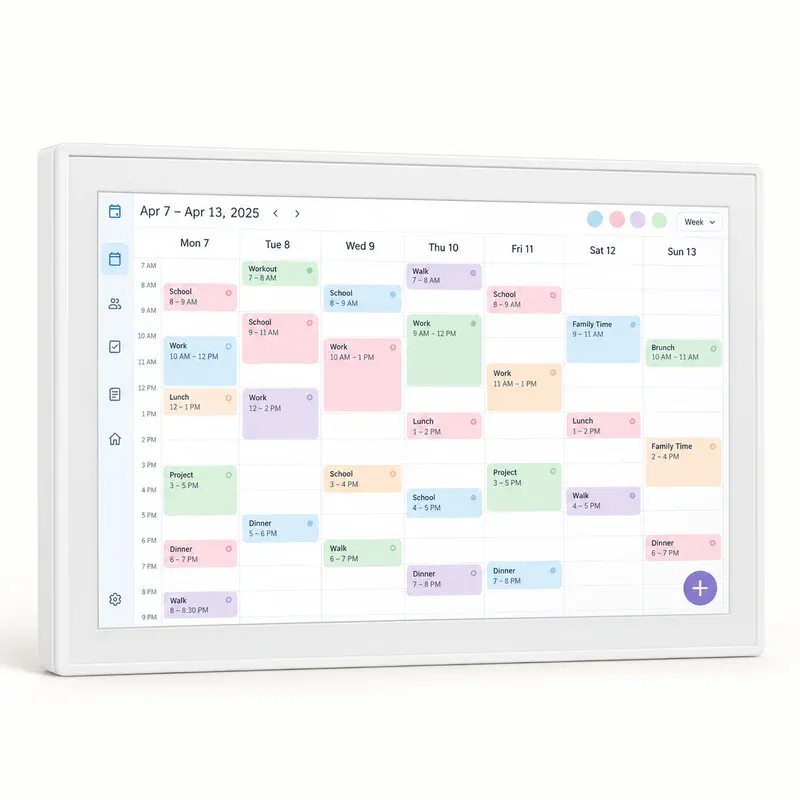
Skylight Calendar
A digital family calendar you can walk past
A visible weekly schedule gives appointments, school events, and work plans a shared home. This is an option when you want to see how the day fits together without opening another app.
Include the time before
For a 3:00 appointment, add “leave at 2:15” as its own event. Put the travel and preparation time on the calendar too.
Setup and subscription details
The linked model is the white 15 inch Skylight Calendar. Basic calendar, task, and list features are available without a subscription; features including meal planning require Calendar Plus.
Allow time to connect calendars and decide where the screen will live. Check the current Plus features.

04 / Get a nudge to switch tasks
Apple Watch timers
Time reminders on your wrist
Wrist reminders can be useful during errands, work sessions, or the stretch before you need to leave. If you already own an Apple Watch, its built in timers give you a place to start.
Make room for the transition
Set a timer for your work session, plus a separate reminder to wrap up before the next appointment. Leave a few minutes to save your work and gather what you need.
Compatibility and things to consider
The linked watch is a Series 11 GPS, 42 mm, in rose gold. Apple lists an iPhone 11 or later with iOS 26 or later for setup. Check compatibility with your exact phone before buying.
Think about charging, how a watch feels on your wrist, and whether extra notifications would distract you. See Apple’s compatibility guide.
A few helpful answers
Choosing your
time support
Practical questions about ADHD timers and time management tools.
Which ADHD time management tool should I try first?
Start with the moment you want help with. A visual timer shows minutes passing during a task. An alarm can mark the next step in a morning routine. A calendar helps you see the week, while wrist reminders move with you.
What should adults look for in an ADHD visual timer?
Look for a display you can read from where you’ll use it, a simple way to set the countdown, and an alert you’re comfortable with. Consider where it will sit and the lengths of time you usually want to track.
Can I use a Pomodoro timer with ADHD?
You can try a timed work session followed by a break. Choose a session length that feels manageable for the task; you don’t have to begin with 25 minutes. Include time to wrap up before you switch to something else.
Are there free ways to manage time blindness?
Try the timer or alarms you already have, write down a leave time, or put a paper weekly calendar in view. You can experiment with a clearer cue before paying for another device.
Keep exploring at your own pace
Product images are AI illustrations. See the linked listings for actual product photos and current details. These tools offer everyday support and aren’t ADHD treatment.